Attention & notifications
A long-running command in an unfocused tab, a Claude Code turn that finished while you were in another window, an OSC 1337 attention signal from a backing app — these all want to surface something to the user without stealing focus. tmnl folds them into a single attention count and surfaces that count through three channels: a dock badge (macOS), a chime (cross-platform), and a prompt-path attention chip (cross-platform, written to disk for shell-prompt frameworks to consume).
This page covers the three channels, the configuration knobs that gate each one, the system-notification path (OSC 9 / 99), and the deliberate non-coverage of Linux dock-badge equivalents — what tmnl ships instead and why.
Where attention comes from
Section titled “Where attention comes from”Each Shell / Native pane carries an attention: bool flag. Anything
that flips it to true increments the per-window attention count;
focusing the pane flips it back to false. Sources include:
- OSC 1337 attention signal — backing apps and pty children emit
ESC ] 1337 ; RequestAttention=fireworks ST(or similar) to flag the user. Claude Code uses this when a turn finishes and it’s waiting for input. - OSC 9 (4) progress signals — ConEmu / iTerm2 progress states ending in “error” or “indeterminate-waiting” also flip the flag. See Shell mode notes for the OSC 9 scanner.
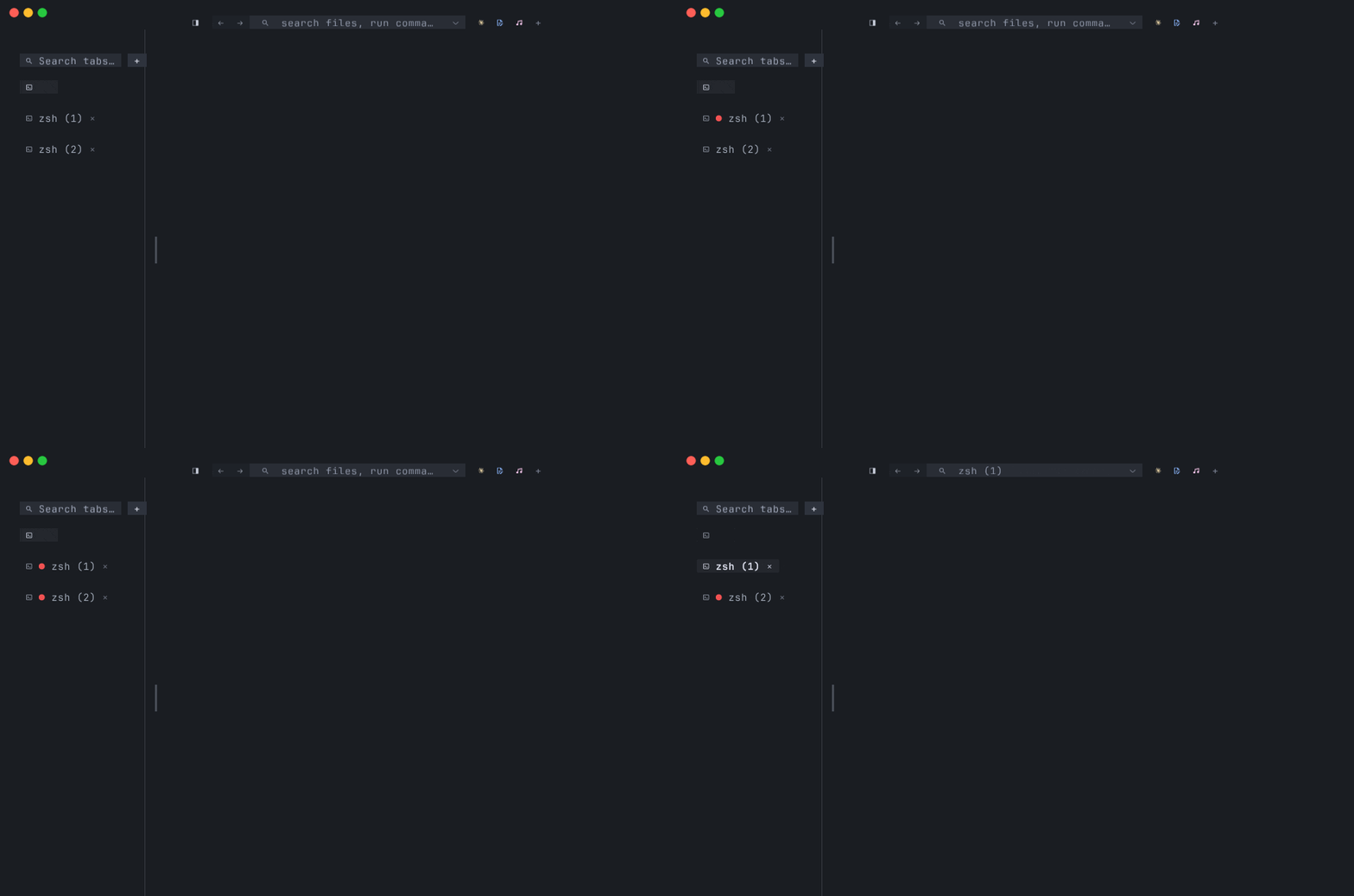
- Tab-strip pane indicators — the same flag drives the
●attention prefix on the tab chip; see Tabs, splits, and panes for the chip rendering side.
The attention count is tabs.iter().filter(|t| any pane attention).count() —
tabs with attention, not total flagged panes. A tab with three
flagged panes counts once.
The dock badge (macOS)
Section titled “The dock badge (macOS)”When dock_badge = true in your config, tmnl writes the attention
count onto the macOS dock tile as a red badge (Mail / Messages
convention):
dock_badge = trueThe badge updates only when the count changes — no per-tick churn.
A count of 0 clears the badge. The implementation calls
NSApp.dockTile.badgeLabel = label on the main thread; no extra
permissions needed.
Linux dock badges — what tmnl does instead
Section titled “Linux dock badges — what tmnl does instead”There’s no universal dock-badge surface on Linux. GNOME has
notification-badge extensions (one of several); KDE uses
StatusNotifierItem; XFCE, sway, hyprland each handle this
differently or not at all. Rather than pick favorites and ship a
spammy or non-functional integration, tmnl leaves the indicator in
the shell prompt path instead — the same surface the chip lives
on.
Concretely: every attention-count change writes the count to
~/.cache/tmnl/attention-count.txt. The themed shell prompt
(mnml-prompt.sh::_mnml_seg_attention) reads this file and renders
a ● N chip on the right side of the prompt when N > 0. The same
file is written on macOS too, so the prompt chip works portably and
sits next to the dock badge when both are enabled.
If you want a Linux dock-style indicator and your DE doesn’t have
one, the prompt chip is the supported surface. If a maintained
GNOME / KDE plugin emerges and stabilizes, the architecture has
room for it as an additional channel — the
notify::set_dock_badge function is already the single dispatch
point.
The chime
Section titled “The chime”A short system sound plays on the rising edge of the attention
count — i.e. when attn_count > prev_attention_count. Configurable
via two knobs:
chime = true # opt-in; default falsebell_sound = "Glass" # any name in /System/Library/Sounds, or # an absolute path, or a freedesktop IDbell_sound accepts:
- A bare name (
Pop,Glass,Submarine,Tink, …) — looked up per platform (see table below). - An absolute path (
/usr/share/sounds/mysound.oga,~/sounds/notification.wav) — played as-is by the platform’s default player; bypasses any name mapping.
Cross-platform sound resolution
Section titled “Cross-platform sound resolution”The same bare name resolves through different lookups per platform:
| Platform | Resolution chain |
| --- | --- |
| macOS | afplay /System/Library/Sounds/<name>.aiff |
| Linux | canberra-gtk-play --id <freedesktop-name> first; if canberra-gtk-play isn’t installed, paplay /usr/share/sounds/freedesktop/stereo/<freedesktop-name>.oga fallback |
| Other | no-op |
On Linux, the macOS sound vocabulary maps onto freedesktop sound IDs so config files that target macOS names work portably:
| bell_sound = … | freedesktop ID |
| --- | --- |
| "Pop" | bell-window-system |
| "Glass" | complete |
| "Submarine" | bell-terminal |
| "Tink" | dialog-information |
| any other bare name | passed through as the freedesktop ID directly |
Absolute paths skip the mapping entirely and go straight to
paplay. So bell_sound = "/usr/share/sounds/custom/notify.oga"
works the same way on both macOS (via afplay’s permissive path
handling) and Linux (via paplay).
All sound playback is non-blocking — tmnl spawns + detaches the player. Missing players or missing sound files fail silently; the chime is cosmetic, not load-bearing.
OSC 9 and OSC 99 — system notifications
Section titled “OSC 9 and OSC 99 — system notifications”Backing apps and pty children can fire OS-level notifications via OSC 9 (bare notification) and OSC 99 (titled notification). Both shell out to the platform’s notification surface:
| Platform | Surface |
| --- | --- |
| macOS | osascript -e 'display notification "..."' — Notification Center; first-time permission prompt, silent thereafter |
| Linux | notify-send "title" "body" — libnotify; no-op if not installed |
| Other | no-op |
The body is sanitized — control characters stripped, capped at 250
chars — so a runaway pty (yes "long notification text") can’t
flood the notification surface.
A custom notifier
Section titled “A custom notifier”notify_command runs an arbitrary script on every rising-edge
attention bump:
notify_command = "~/bin/tmnl-attention.sh"The script gets the count via TMNL_ATTENTION_COUNT. It’s
backgrounded so a slow notifier doesn’t stall the event loop; tmnl
doesn’t wait for or read its output. This is the escape hatch for
custom surfaces — send a Slack DM, flash an LED via HID, post to a queue, whatever — without baking those integrations into the
binary.
Putting it together
Section titled “Putting it together”# ~/.config/tmnl/config.toml — the full attention-channel configdock_badge = true # macOS dock tilechime = true # play a sound on rising edgebell_sound = "Glass" # which sound; portable namenotify_command = "~/bin/notify.sh" # optional custom hookEach channel is independent — turn any on or off without affecting the others. The prompt-path attention chip always writes; it’s the one surface that costs nothing (a single-byte file write per change) and works on both platforms regardless of any flag.
Where to go next
Section titled “Where to go next”- OSC 133 shell integration — the
semantic-prompt parser whose
D;<N>mark feeds the per-command exit-code chip on tab labels. Different feature, related signal surface. - Tabs, splits, and panes — where the
per-pane
●attention chip is painted on the tab strip. - Themes — the attention dot’s red color is themed alongside the rest of the chrome palette.
- FEATURES.md — the shipped-feature inventory.
- The implementation lives in
src/notify.rs(theset_dock_badge/play_sound/write_attention_count/system_notificationhelpers) and is driven from the per-tick attention-count fold insrc/app.rs.