Keybindings
This page is the authoritative key reference for tmnl. Every row maps a chord
to a command id in src/command.rs, and every chord is one entry in the keymap
built by src/keymap.rs::Keymap::build. The same registry feeds the in-app
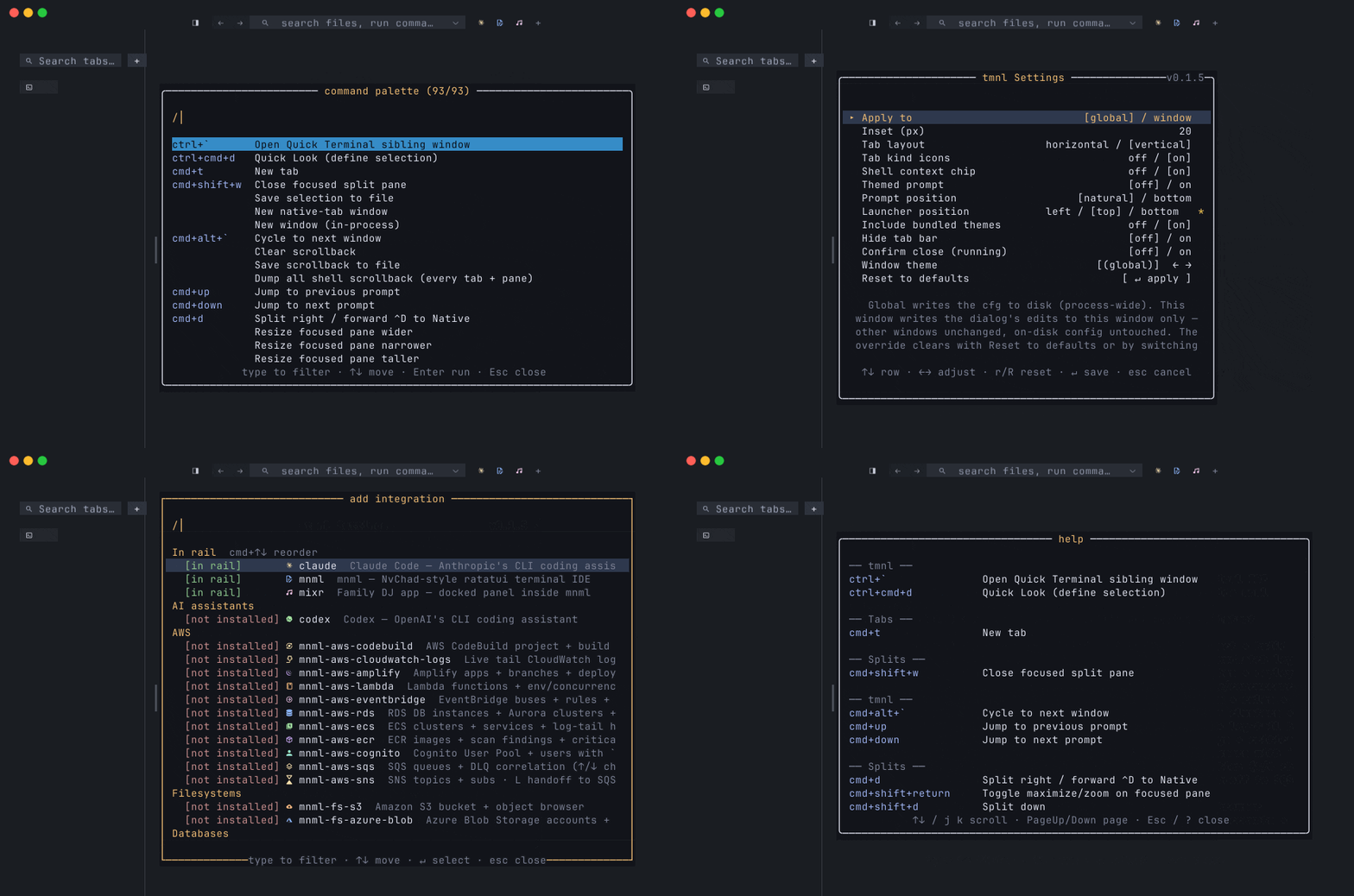
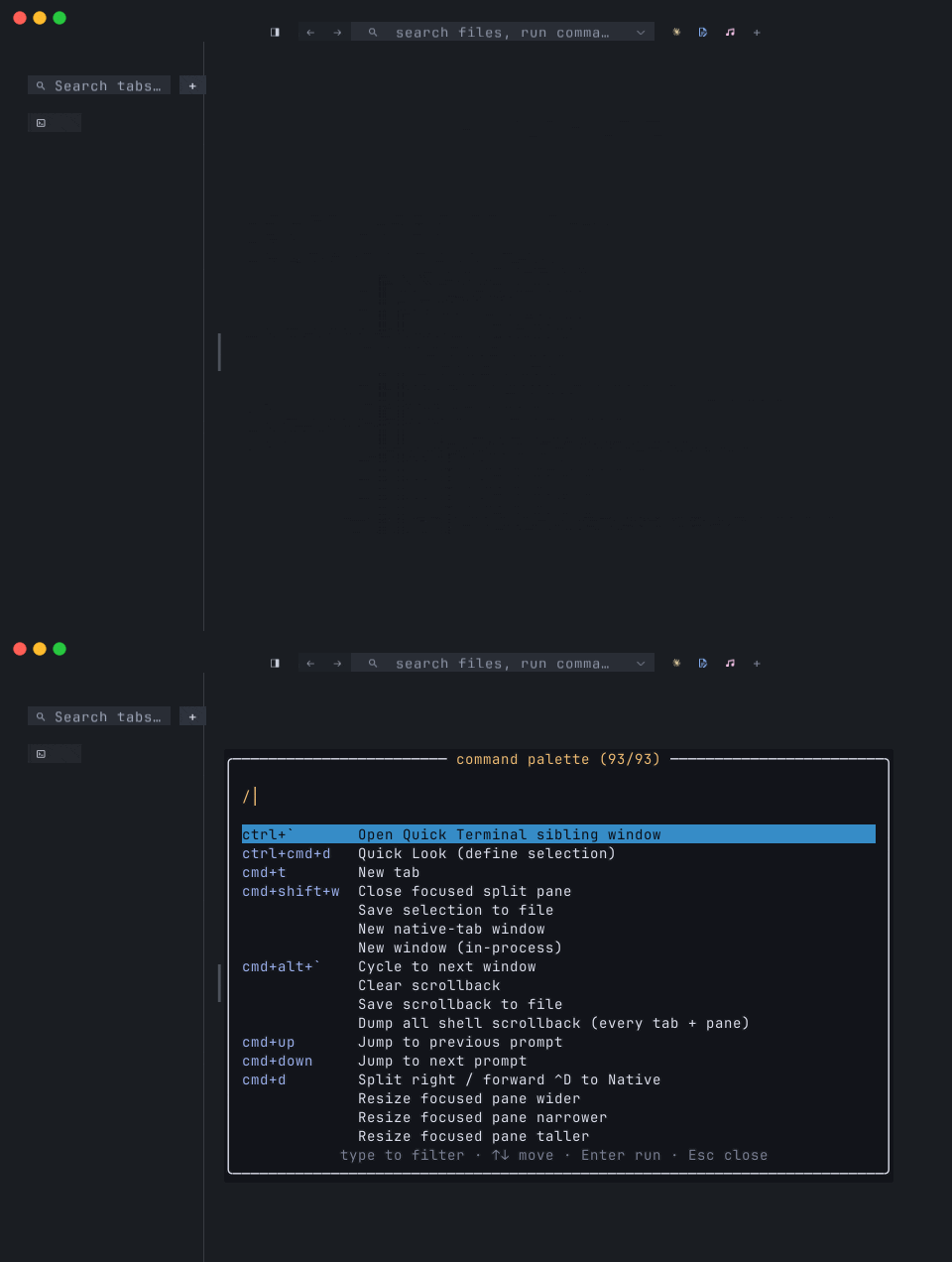
help overlay (⌘⇧/) and the command palette (⌘⇧P) — this page is just the
flat searchable form.
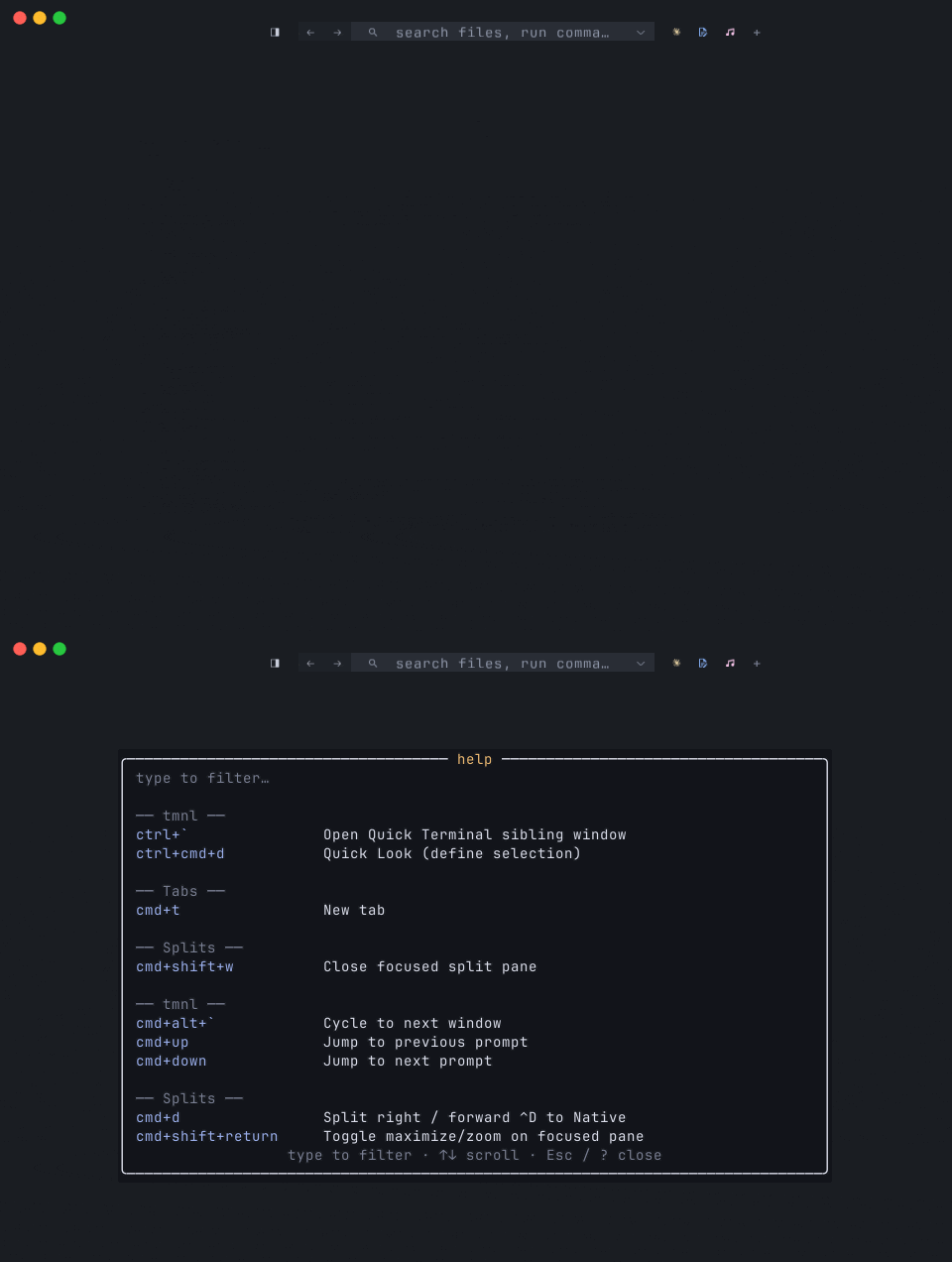
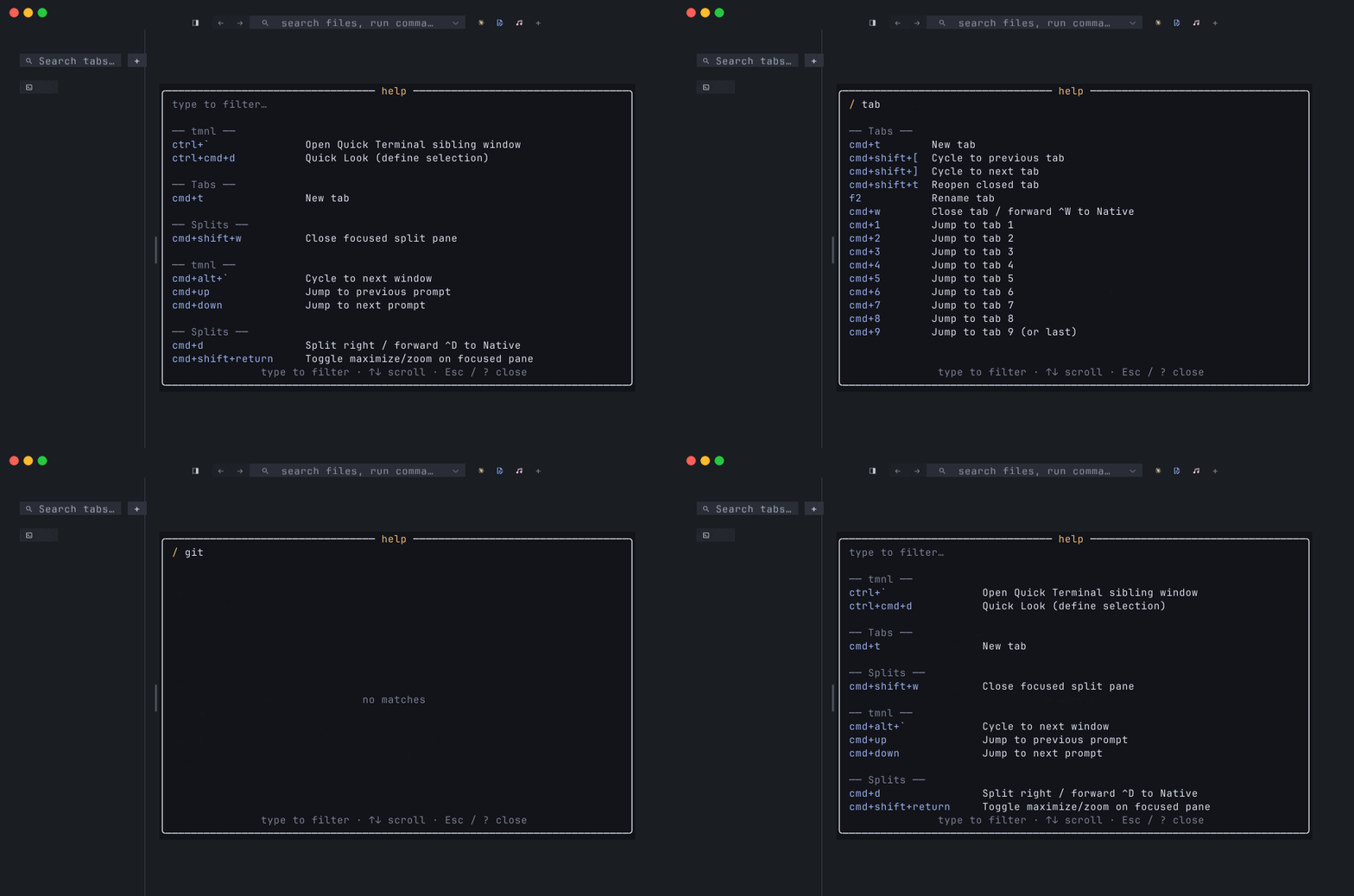
The overlay also supports a substring filter — start typing while it’s open and the list narrows to bindings whose chord or title contains what you’ve typed (case-insensitive). Section headers disappear when no binding under them survives. Backspace pops one character; Esc closes the overlay. Useful when you know roughly what a command does but don’t remember the chord.
A few facts that shape the table:
⌘issuper_key()in winit terms — macOS Command, Windows Win key. Cross-platform chord specs usecmd+…interchangeably withsuper+….- Forwarded chords. When a chord’s command id starts with
fwd.or is marked “forward to Native”, tmnl translates the keystroke into theCtrl-equivalent and sends it to the focused Native pane’s protocol server. That’s how⌘S/⌘P/⌘B/⌘/reach mnml’s own bindings (Ctrl+S/Ctrl+P/ etc.) without tmnl needing to know what they do. Shell panes are unaffected — these chords no-op there. - Pane-kind gates. Some chords only fire when a specific pane type is
focused:
no_modal_open_native_focus(Native — mnml / mixr / etc.),no_modal_open_browser_focus(Browser). The rest gate onno_modal_open— they don’t fire while a settings, help, palette, find, rename, or confirm dialog is up. - Modal supersede.
⌘⇧P(palette) and⌘R(recents) use thepalette_open_or_supersedepredicate — they close any transient overlay (find bar, tab search, discovery, context menu) before opening themselves, so the chord works from inside another overlay instead of being a silent no-op. Destructive modals (rename, confirm-close, confirm-paste, settings, help) still block.
Customizing
Section titled “Customizing”Add a [[keybind]] block to ~/.config/tmnl/config.toml:
[[keybind]]key = "cmd+t"action = "tabs.cycle_next"        # any command id from the tables below
[[keybind]]key = "cmd+shift+w"action = "unbind"                  # remove the chord entirely
The keymap builder walks defaults first, then applies overrides on top —
last-write-wins. Unparseable chord specs log a warning and are skipped;
the rest of the overrides still apply. Modifier order is free
(shift+cmd+t == cmd+shift+t); chord parsing is case-insensitive.
| Chord | Command id | What it does | Notes |
| --- | --- | --- | --- |
| ⌘T | tab.new | New tab — same kind as the window (shell or Native) | With macos_native_tabs = true, spawns a sibling NSWindow that AppKit auto-merges into the tab bar |
| ⌘W | tab.close_or_forward | Close tab — or forward ⌃W to Native | Native panes get the forward so mnml’s buffer-close confirmation fires |
| ⌘⇧W | pane.close | Close focused split pane | Collapses the split when siblings remain; closes the tab if it’s the last pane |
| ⌘⇧T | tab.reopen_closed | Reopen the most recently closed shell tab | Restores custom_name + cwd; Native tabs are not stacked |
| ⌘⇧[ | tab.cycle_back | Cycle to previous tab | Wraps |
| ⌘⇧] | tab.cycle_forward | Cycle to next tab | Wraps |
| ⌘1 … ⌘8 | tab.goto_1 … tab.goto_8 | Jump to tab N | Native panes get the chord forwarded as ⌥N so mnml’s tab.goto_N fires inside mnml |
| ⌘9 | tab.goto_9 | Jump to last tab | Clamps to tabs.len() - 1 when fewer than 9 tabs are open |
| F2 | tab.rename | Rename focused tab | VS Code parity — keyboard surface for the right-click-rename mouse path |
| — | tab.move_left / tab.move_right | Reorder active tab | Chord-less; bind via [[keybind]] |
Splits and panes
Section titled “Splits and panes”| Chord | Command id | What it does | Notes |
| --- | --- | --- | --- |
| ⌘D | split.right | Split focused pane right (new shell pane) | Inside a Native pane, forwarded as ⌃D so mnml’s multi-cursor “select next occurrence” fires |
| ⌘⇧D | split.down | Split focused pane down | |
| ⌘⇧↩ | pane.toggle_zoom | Maximize/restore focused pane | iTerm convention; preserves the split tree underneath |
| ⌘⌥← | focus.left | Focus pane left | |
| ⌘⌥→ | focus.right | Focus pane right | |
| ⌘⌥↑ | focus.up | Focus pane up | |
| ⌘⌥↓ | focus.down | Focus pane down | |
| ⌘⌥B | split.browser_right | Split right with a Browser pane at duckduckgo.com | |
| ⌘⌥V | split.browser_clipboard | Split right with Browser at the clipboard URL | Clipboard must start with http:// or https:// |
| ⌘⌥D | browser.attach_dashboard | Spawn or attach Playwright dashboard in a Browser split | Polls CDP :9222 for up to ~5s for the dashboard target |
| ⌘⌥⇧D | browser.attach_dashboard_auto | Auto-attach Playwright dashboard, click first session, hide chrome | Injects an init-script that runs before page scripts on every navigation |
| ⌘⌥H | browser.toggle_dashboard_chrome | Toggle the dashboard’s sidebar + sash | Idempotent — re-running undoes the previous toggle by checking <style id="tmnl-hide-dashboard-chrome"> |
| — | pane.resize_wider / pane.resize_narrower / pane.resize_taller / pane.resize_shorter | Resize focused pane ±5% | Surfaced via Shell ▸ Splits |
| — | pane.equalize | Equalize all splits | |
| — | split.native_editor_right | Split right with mnml (Native) | Requires editor_template to be set in cfg |
Windows
Section titled “Windows”| Chord | Command id | What it does | Notes |
| --- | --- | --- | --- |
| ⌘⌥` | window.cycle_next | Cycle to next background window | No-op when only one window is open |
| — | window.new | New window (in-process) | Menu-bound; AppKit owns ⌘N for the “New Window” menu accelerator, so a default chord here would never reach the keymap. Bind a non-⌘N chord via [[keybind]] |
| ⌃` | tmnl.quick_terminal_spawn | Spawn a sibling tmnl in Quick Terminal mode | Borderless, always-on-top, half-screen-height. For a true system-wide hotkey, bind one to tmnl --quick-terminal at the OS level |
| — | tmnl.new_tabbed_window | New native-tab window | Chord-less by default — ⌘⇧T belongs to tab.reopen_closed |
Launcher rail
Section titled “Launcher rail”| Chord | Command id | What it does |
| --- | --- | --- |
| ⌘⇧1 | launcher.open_1 | Open the 1st configured launcher in a new tab |
| ⌘⇧2 | launcher.open_2 | Open the 2nd configured launcher |
| ⌘⇧3 … ⌘⇧9 | launcher.open_3 … launcher.open_9 | … through the 9th |
Indices past the configured count silently no-op (the chord matched but
new_launcher_tab(idx) short-circuits when no icon exists at that
position). The launchers are sourced from [[ui.launcher_icon]] in
~/.config/tmnl/config.toml. See
Integrations for what gets pinned to the rail.
Text and selection
Section titled “Text and selection”| Chord | Command id | What it does | Notes |
| --- | --- | --- | --- |
| ⌘A | edit.select_all | Select all in focused pane | Shell: whole scrollback; Native: forwards to client |
| ⌘C | edit.copy | Copy selection to clipboard | Falls through to ⌃C forward when there’s no selection — so the chord still interrupts a running shell command |
| ⌘V | fwd.cmd_v | Paste | Shell panes: clipboard is sanitized (strips C0/C1 controls, ESC, DEL, NUL) then sent with bracketed-paste markers when the program enabled them. Multi-line pastes open a confirm overlay when clipboard_paste_protection = true. Native panes: forwarded as ⌃V |
| ⌘X | fwd.cmd_x | Cut (⌘X → ⌃X forwarded to Native) | Native-focus only |
| ⌘Z | fwd.cmd_z | Undo (⌘Z → ⌃Z forwarded to Native) | Native-focus only |
| ⌘S | fwd.cmd_s | Save (⌘S → ⌃S forwarded to Native) | Native-focus only |
| ⌘N | fwd.cmd_n | New (⌘N → ⌃N forwarded to Native) | Native-focus only. Note: AppKit intercepts ⌘N for the Shell ▸ New Window menu accelerator before winit fires, so this only reaches the keymap when no menu is bound to the chord |
| ⌘P | fwd.cmd_p | File picker (⌘P → ⌃P forwarded to Native) | Native-focus only |
| ⌘B | fwd.cmd_b | Toggle tree (⌘B → ⌃B forwarded to Native) | Native-focus only |
| ⌘G | fwd.cmd_g | Goto line (⌘G → ⌃G forwarded to Native) | Native-focus only |
| ⌘/ | fwd.cmd_slash | Toggle comment (⌘/ → ⌃/ forwarded to Native) | Native-focus only |
| ⌘F | find.open | Open in-pane find bar | Returns a session that survives close; Enter / Shift-Enter step matches |
| — | selection.save | Save selection to a tmnl-selection-*.txt file under ~/Desktop | Chord-less; surfaced via the palette |
⌘C and ⌘V are the two most chord-aware verbs. Both inspect the focused
pane’s kind before deciding what to do:
- Shell with selection —
⌘Cwrites the text to the system clipboard (pbcopy/wl-copy/ PowerShellSet-Clipboard) and clears the selection. - Shell, no selection —
⌘Cfalls through to a⌃Cforward so the chord still interrupts the running command. - Native — both
⌘Cand⌘Vare forwarded as⌃C/⌃Vso mnml’s own bindings handle them.
Scrollback
Section titled “Scrollback”These chords address the focused Shell pane’s vt100 scrollback. They no-op on Native and Browser panes.
| Chord | Command id | What it does | Notes |
| --- | --- | --- | --- |
| ⌘↑ | scrollback.prev_prompt | Jump to previous OSC 133 prompt mark | Toasts “no earlier prompt tracked” when the integration snippet isn’t installed. See OSC 133 shell integration |
| ⌘↓ | scrollback.next_prompt | Jump to next prompt mark | |
| ⌘Home | scroll.top | Jump to the top of scrollback | |
| ⌘End | scroll.bottom | Snap back to the live cursor | |
| ⇧PageUp | scroll.page_up | Scroll one page up | Page size = gpu.grid.rows − 1 |
| ⇧PageDown | scroll.page_down | Scroll one page down | |
| — | scrollback.clear | Wipe scrollback | Talks to the vt100 parser directly, so it works mid-command (unlike typing clear) |
| — | scrollback.save | Write the focused pane’s scrollback to a file under ~/Desktop | |
| — | scrollback.dump_all_panes | Dump every shell pane across every tab into ~/Desktop/tmnl-scrollback-dump-<ts>/ with an INDEX.txt | See Scrollback dump |
View — palette, settings, help
Section titled “View — palette, settings, help”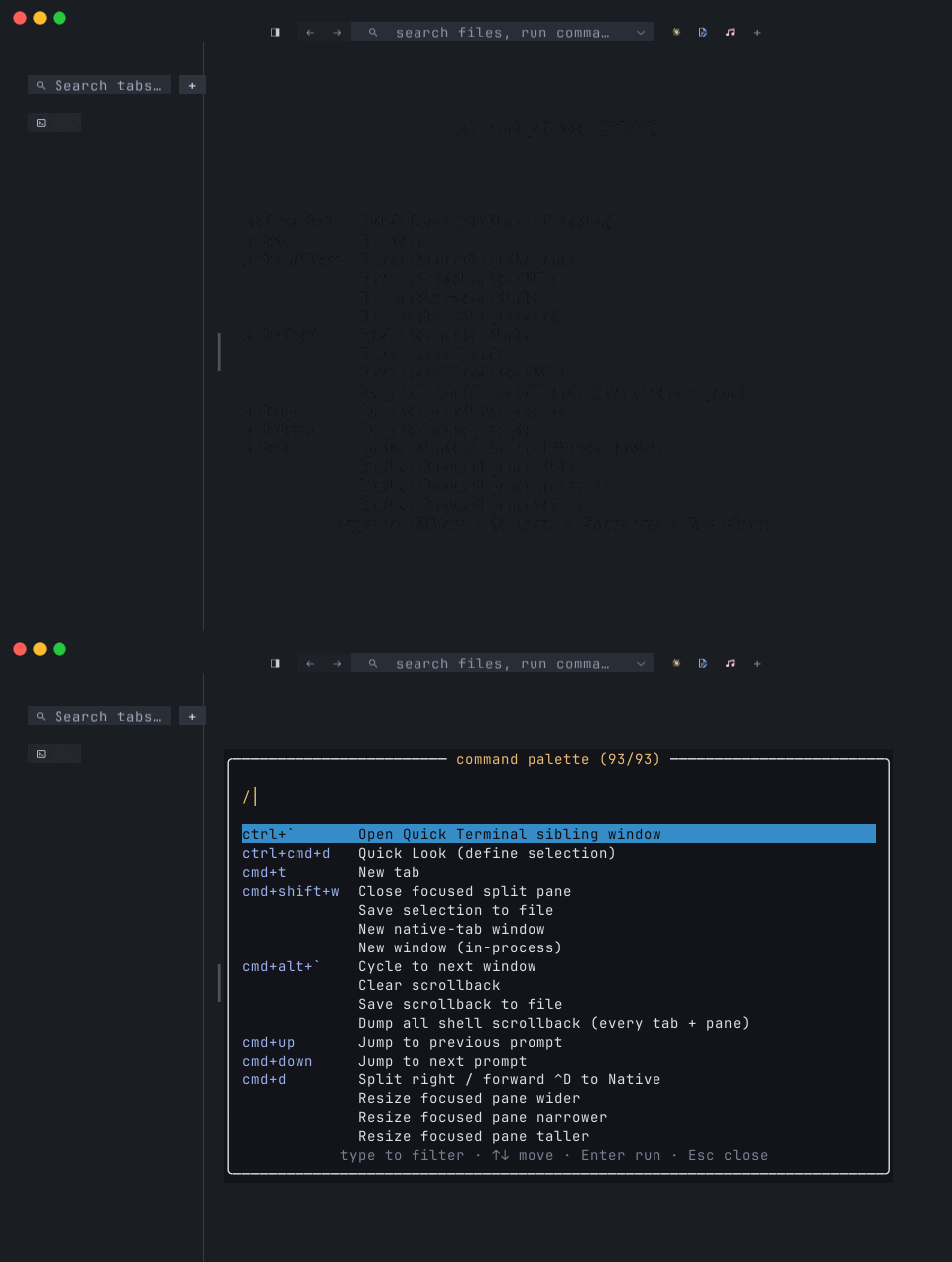
| Chord | Command id | What it does | Notes |
| --- | --- | --- | --- |
| ⌘⇧P / F1 | palette.open_or_forward | Open the command palette | Inside a Native pane, forwarded as ⌃⇧P so mnml’s palette opens instead. Toggles closed when re-pressed. Supersedes transient overlays (find, tab-search, discovery, context menu) — closes them first so the palette gets clean ownership |
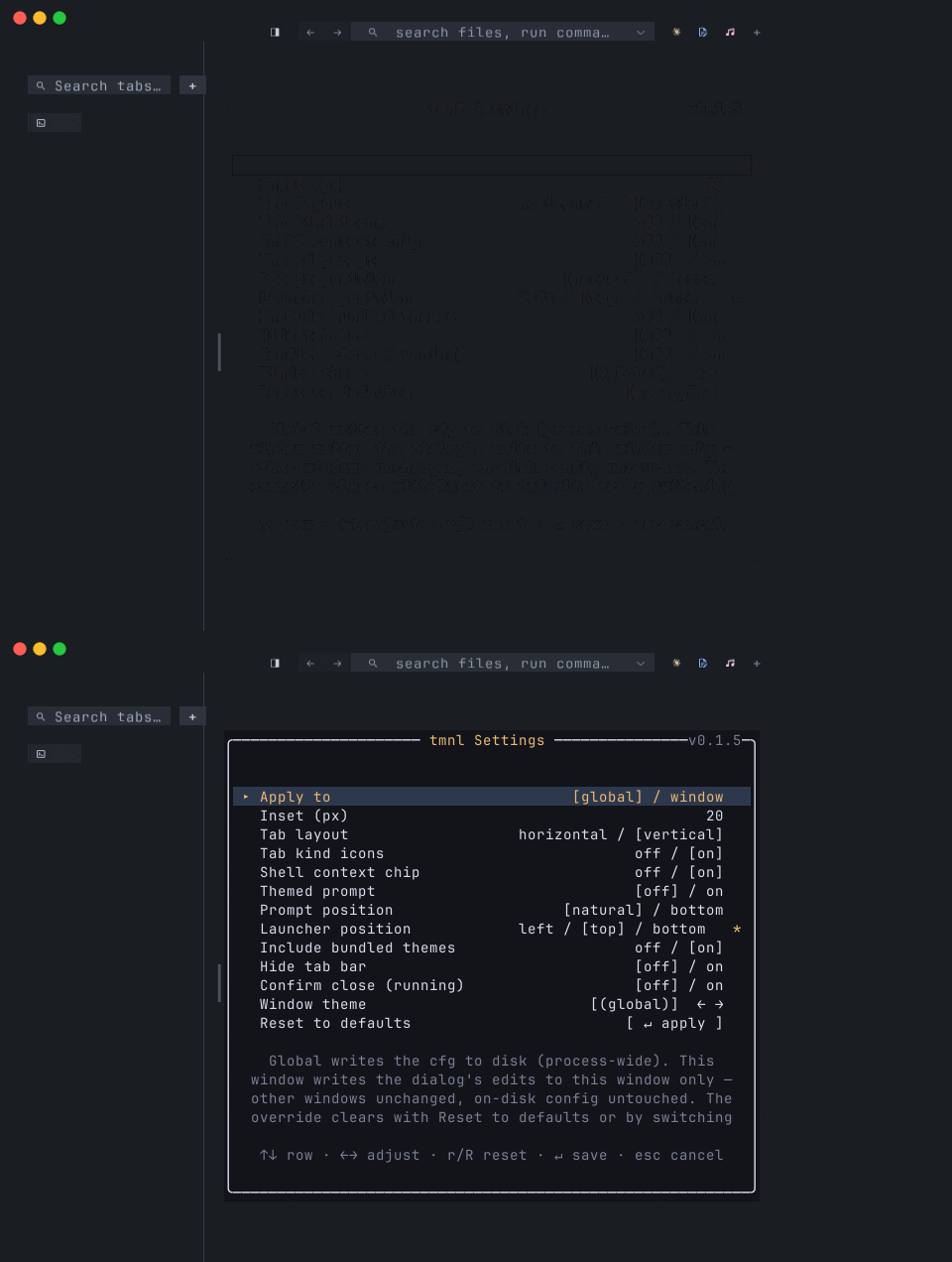
| ⌘, | view.settings | Toggle the in-grid Settings modal | Re-press with settings open is treated as Esc — reverts to the snapshot taken when the modal opened |
| ⌘R | view.recents | Toggle the recents picker | Inside a Browser pane this becomes location.reload() instead (Safari convention) |
| ⌘⇧/ / ⌘? | view.help | Toggle the in-app help overlay | macOS Help-key convention; the overlay reads command::help_rows() so every chord on this page is also listed there |
| ⌘⇧I | view.discovery | Toggle the ”+ Add integration” overlay | Same overlay the + chip in the launcher rail opens. Typing into the open overlay filters the catalog |
| ⌘F | find.open | Open in-pane find | See above |
| — | view.tab_search | Toggle tab search (filter chips by name) | Chord-less — ⌘⇧T belongs to tab.reopen_closed. Surfaced via the search chip in the sidebar header |
| — | view.toggle_sidebar | Show/hide the launcher-rail sidebar | Persists in cfg |
| — | view.reset_sidebar_width | Clear a drag-resized sidebar’s width override | Auto-fit takes over again |
| — | view.toggle_tab_bar | Show/hide the tab bar | Persists in cfg |
Font zoom
Section titled “Font zoom”| Chord | Command id | What it does |
| --- | --- | --- |
| ⌘= / ⌘⇧= | view.zoom_in | Increase font size by one FONT_ZOOM_STEP |
| ⌘- / ⌘⇧- | view.zoom_out | Decrease font size |
| ⌘0 | view.zoom_reset | Reset zoom to the cfg default |
Themes
Section titled “Themes”| Chord | Command id | What it does |
| --- | --- | --- |
| ⌘⌥] | theme.cycle_next | Cycle the focused window’s theme override forward |
| ⌘⌥[ | theme.cycle_prev | Cycle backward |
| — | theme.refresh | Reload the chrome palette from mnml’s config |
The cycle walks (global) followed by the alphabetically-sorted theme
names from theme::list_theme_names(). Picking (global) clears the
per-window override so the global theme governs the chrome. The tick loop
polls mnml’s config-file mtime for live reload — theme.refresh is the
manual escape hatch when the auto-poll misses (network-mounted homedir,
out-of-band writes, etc.). See Themes.
Browser pane
Section titled “Browser pane”These four chords only fire when a Browser pane has focus
(no_modal_open_browser_focus).
| Chord | Command id | What it does |
| --- | --- | --- |
| ⌘[ | browser.back | history.back() |
| ⌘] | browser.forward | history.forward() |
| ⌘L | browser.focus_url_bar | Focus the URL bar |
| — | browser.reload | location.reload() | ⌘R is the gate — when a Browser pane is focused, view.recents reroutes to reload instead of opening recents |
AI completion
Section titled “AI completion”| Chord | Command id | What it does |
| --- | --- | --- |
| ⌘I | ai.completion | Complete the current command line in the focused Shell pane |
| ⌘K | ai.generate | Generate a command from a description prompt |
Both run offline against the local fim-engine model. The model loads
lazily on first use; subsequent invocations are warm. See
AI completion (offline) for the engine details and
the per-shell prompt extraction.
tmnl-specific
Section titled “tmnl-specific”| Chord | Command id | What it does |
| --- | --- | --- |
| ⌃⌘D | tmnl.quick_look | Quick Look (define selection) — opens dict://<word> in the macOS Dictionary app | macOS only |
| ⌃` | tmnl.quick_terminal_spawn | Spawn a sibling tmnl in Quick Terminal mode | |
| ⌘⌥` | window.cycle_next | Cycle to next window | |
Chords AppKit owns first
Section titled “Chords AppKit owns first”A handful of chords are bound to menu items in src/menu.rs and reach the
menu dispatcher (drain_menu_events) instead of the keymap. They show up in
the keymap registry too, but the menu accelerator preempts the winit
KeyboardInput:
⌘N— Shell ▸ New Window (window.new)⌘⇧K— Edit ▸ Clear Scrollback (scrollback.clear)
Both still end up calling the same App method as their registry
counterparts, via command::dispatch_by_id in the menu router. The
practical consequence: a [[keybind]] override on ⌘N won’t take effect
on macOS because AppKit consumes the chord before tmnl sees it. Pick a
different chord for these.
Headless dispatch
Section titled “Headless dispatch”The headless harness (tmnl --headless --app) can’t construct winit’s
KeyEvent (it has private platform-specific fields), so synthetic chord
dispatch routes through Keymap::resolve_all_chord(&Key, ModifiersState)
instead. Behavior matches the live keymap; the differences are in the
event envelope, not the resolution.
- Menu bar reference — the same surface, organized by menu instead of by category.
- Tabs, splits, and panes — the pane model behind the splits commands.
- Multi-window — how the per-window override layer interacts with the chord registry.
- Native tabs — what “forwarded as
⌃X” actually sends over the wire. - OSC 133 shell integration — what makes
⌘↑/⌘↓work in your shell.