Themes
tmnl’s chrome — the strip background, the tab pills, the search chip, the
text colors — is a single Palette struct. The struct is small (a handful
of straight-sRGB [r, g, b, a] quads), it’s read by every render-path call
site, and it’s process-global by default (with thread-local override hooks
for per-window themes; see Multi-window).
Quick start
Section titled “Quick start”Pin a theme by name in ~/.config/tmnl/config.toml:
theme = "kanagawa"Six themes are bundled into the binary — no extra files needed:
onedark(default)kanagawagruvboxtokyonightcatppuccinnord
Save the file and the next tmnl launch picks it up. To swap live without
editing the config, cycle with ⌘⌥] / ⌘⌥[ (see
Cycling themes — chord + menu).
Light / dark auto-switching
Section titled “Light / dark auto-switching”tmnl can follow the macOS system appearance and swap between a paired
dark + light theme on every flip. Two knobs in
~/.config/tmnl/config.toml:
follow_system_appearance = truetheme = "dark:catppuccin,light:onedark"The pair syntax matches Ghostty’s. When follow_system_appearance is on
and theme carries a dark:.../light:... pair, tmnl picks the right
side based on the current OS appearance and re-runs theme adoption on
every system flip. If theme is unset, tmnl falls back to mnml’s
[ui] theme (the existing single-theme behavior).
Without follow_system_appearance (the default), theme is treated as
a single pinned name and the OS appearance is ignored. On non-macOS
platforms follow_system_appearance has no effect — pin a single name.

This page is about where the palette comes from. Specifically:
- The six themes bundled into the binary for standalone use.
- The on-disk precedence chain that lets mnml-installed themes (and Ghostty community themes) win over bundled ones.
- How mnml’s
[base_30]schema maps onto tmnl’s chrome roles.
If you want to pick a theme, that lives in the Settings overlay’s “Window theme” row — see Multi-window. If you want to understand what your pick is doing, you’re on the right page.
Six bundled starter themes
Section titled “Six bundled starter themes”tmnl previously resolved theme files only from mnml’s install directory
(~/.config/mnml/themes/). That works when mnml is also installed; the
standalone tmnl-only install had no themes at all.
The binary now bakes in six starter themes via include_str!:
| Name | Origin |
| --- | --- |
| onedark | mnml’s default theme (and tmnl’s curated default, eyedropped from this same theme rendered in Apple Terminal). |
| kanagawa | Calm warm-blue palette. |
| gruvbox | High-contrast retro warm palette. |
| tokyonight | Cool blue / purple palette. |
| catppuccin | Pastel warm palette. |
| nord | Cool blue-grey palette. |
These are mnml-format .toml files copied into tmnl/themes/ and pulled
in at compile time. A fresh cargo install tmnl-rs ships them in the
binary itself — no install steps, no extra files on disk.
The Settings overlay’s “Window theme” row reads the merged set (bundled + on-disk) so the picker shows every available theme even on a machine where mnml has never been installed.
Hiding the bundled themes from the picker
Section titled “Hiding the bundled themes from the picker”Power users with a curated ~/.config/mnml/themes/ may not want the
bundled set polluting their picker. The Settings overlay row
“Include bundled themes” (the row sitting between “Show welcome” and
“Window theme”) flips a config-level toggle:
include_bundled_themes = falseWhen off, theme::list_theme_names skips the bundled merge and the
“Window theme” picker shows only what’s actually on disk. The on-disk
side of the resolver is untouched — a name like kanagawa still resolves
through the seven-step precedence chain below; flipping this off only
hides bundled names from the picker list.
User-installed themes always win on a name collision regardless of the toggle. The flag affects discovery (what shows up), not resolution (what wins on lookup).
The implementation pattern is worth knowing if you’re writing similar
process-wide toggles. theme::list_theme_names is a free function called
from several call sites; rather than thread a &Config through every
caller, the toggle lives on a process-wide
AtomicBool (theme::INCLUDE_BUNDLED_THEMES). App::resumed mirrors
the cfg value at startup via theme::set_include_bundled_themes(on), and
the Settings overlay re-mirrors on every commit so user toggles take
effect without an app restart.
The precedence chain
Section titled “The precedence chain”load_theme_palette(name) walks candidate locations in order and returns
the first hit:
| # | Path | Format |
| --- | --- | --- |
| 1 | ~/.config/mnml/themes/<name>.toml | mnml |
| 2 | ~/Library/Application Support/mnml/themes/<name>.toml (mac data dir) | mnml |
| 3 | ~/Projects/mnml/themes/<name>.toml (dev fallback) | mnml |
| 4 | ~/.config/mnml/themes/<name>.ghostty | Ghostty |
| 5 | ~/Library/Application Support/mnml/themes/<name>.ghostty | Ghostty |
| 6 | ~/Projects/mnml/themes/<name>.ghostty | Ghostty |
| 7 | Bundled themes/<name>.toml (include_str!-baked) | mnml |
The first stop that contains a parseable theme wins. User installs always
beat bundled themes on the same name: drop your own kanagawa.toml into
~/.config/mnml/themes/ and tmnl picks it up over the bundled copy
without further configuration.
The dev fallback at ~/Projects/mnml/themes/ exists so the tmnl repo
checkout can drive a working theme picker for contributors before they’ve
shipped a release. It’s intentionally last in the on-disk list.
If every candidate misses, load_theme_palette returns None and the
caller (Palette::from_mnml / Palette::from_theme_name) falls back to
Palette::defaults — the curated onedark eyedrop.
Two theme formats, one resolver
Section titled “Two theme formats, one resolver”mnml format (.toml)
Section titled “mnml format (.toml)”Native format. The relevant block is [base_30], mnml’s chrome palette
schema. tmnl parses a small subset of fields:
[base_30]darker_black = "#1A1D22" # strip / clear_bgblack = "#1E2228" # arrow button pillblack2 = "#24272D" # active tab pillone_bg = "#292D35" # search chip bodywhite = "#E6E8EC" # bright text (active tab labels, palette title)grey_fg = "#9FA7B4" # tab label foregroundgrey_fg2 = "#7A828F" # dim_fg (URL hints, "waiting for client" text)yellow = "#F0B96A" # accent (keymap hints)blue = "#61AFEF" # primary blue chipEach field is parsed via hex(s) (#rrggbb or rrggbb) and projected
onto a Palette field by map_mnml_to_palette. Missing optional fields
(black2, grey_fg2, yellow, blue) fall back to Palette::defaults
per-field, so older theme files without black2 still load cleanly.
Ghostty format (.ghostty)
Section titled “Ghostty format (.ghostty)”Ghostty’s permissive key = value config file. The parser is forgiving:
blank lines, #-comments, whitespace around = are all fine, and unknown
keys (e.g. font-family, cursor-style) are silently dropped.
Recognised keys:
background = #1a1b26foreground = #c0caf5cursor-color = #c0caf5selection-background = #283457selection-foreground = #c0caf5palette = 0=#15161epalette = 4=#7aa2f7palette = 8=#414868palette = 11=#e0af68palette = 12=#7aa2f7Ghostty themes don’t carry chrome slots — there’s no “tab pill background”
field in the format. map_ghostty_to_palette auto-derives the three-tier
chrome gradient by lifting the terminal background by 8% / 16% / 24%
toward white. The proportions match the onedark default
(#1A1D22 → #1E2228 → #24272D → #292D35).
Text colors lean on the ANSI palette:
| tmnl role | Ghostty palette slot |
| --- | --- |
| tab_fg (inactive tab labels) | index 7 (white / light grey) |
| dim_fg (URL hints, secondary text) | index 8 (bright black) — falls back to a 60% blend of fg→bg if missing |
| accent_fg (keymap hints) | index 11 (bright yellow), then index 3 (yellow) |
| blue (primary chip) | index 12 (bright blue), then index 4 (blue) |
The point of supporting Ghostty’s format is leverage: the community ships
hundreds of .ghostty theme files. Drop any of them into
~/.config/mnml/themes/ and tmnl loads them with no migration step and no
second config surface.
How mnml’s schema maps onto tmnl’s chrome
Section titled “How mnml’s schema maps onto tmnl’s chrome”tmnl’s Palette struct is intentionally small — chrome only, not the
40-slot terminal palette a shell renders into. The mapping looks like:
| Palette field | mnml base_30 field | What it paints |
| --- | --- | --- |
| clear_bg, strip_bg | darker_black | Top-of-window letterbox + tab strip background |
| btn_bg | black | Arrow button pill (back / forward) — tier 1 of the 3-tier chrome gradient |
| active_chip_bg | black2 | Active tab pill — tier 2 |
| chip_bg | one_bg | Search chip body — tier 3 (the brightest, primary affordance) |
| text_fg | white | Active tab labels, palette title — the bright text role |
| tab_fg | grey_fg | Inactive tab labels — brighter than dim_fg because tabs are nav |
| dim_fg | grey_fg2 (aliases: light_grey) | URL hints, “waiting for client” text, secondary chrome |
| accent_fg | yellow (alias: orange) | Keymap hints, highlight glyphs |
| blue | blue | Primary blue chip (TREE pill style in mnml’s statusline; exported as MNML_PROMPT_BLUE so a shell prompt can match) |
The three-tier gradient inside the bufferline cluster
(btn_bg < active_chip_bg < chip_bg) is the key visual cue — each tier
sits visibly above the strip background, so tab pills and search chips
read as raised surfaces over the chrome row.
The alias-stripping gotcha
Section titled “The alias-stripping gotcha”mnml’s MnmlBase30 accepts light_grey as an alias for grey_fg2, and
orange as an alias for yellow. The serde deserializer errors on
“duplicate field” when both members of a pair appear in the same TOML
block.
Most on-disk theme files in mnml’s repo include both aliases. The filesystem probe used to swallow the parse error silently and fall through to the next candidate; the bundled path doesn’t have that fallback — if a bundled theme can’t parse, the standalone install has no theme.
The six bundled themes are mnml’s theme files with the light_grey /
orange duplicate-alias lines stripped, so they parse cleanly through
include_str! + toml::from_str. The on-disk equivalents in mnml’s
install retain both aliases; the read_mnml_theme_file probe logs the
parse error and falls through. Same theme, two valid forms. Don’t strip
the aliases from your own ~/.config/mnml/themes/ files unless they’re
already breaking — mnml itself needs them.
Cycling themes — chord + menu
Section titled “Cycling themes — chord + menu”![⌘⌥] cycling tmnl's chrome through the bundled themes — onedark → kanagawa → gruvbox → tokyonight → catppuccin → nord](/_astro/theme-cycle.9p7OMYmJ.gif)
⌘⌥] / ⌘⌥[ cycle the focused window through the discovered theme
list (bundled + on-disk, in the precedence-chain order resolved per
name). The chord paths to the palette commands theme.cycle_next /
theme.cycle_prev, which are also discoverable via the View menu:
| Menu entry | Accelerator | Palette command |
| --- | --- | --- |
| View → Next Theme | ⌘⌥] | theme.cycle_next |
| View → Previous Theme | ⌘⌥[ | theme.cycle_prev |
The menu mirrors the chord — same accelerator displayed next to the entry — so users who don’t know the chord can find the action through the standard macOS menu path or macOS’s Help-menu search (typing “Next Theme” lands on the menu entry directly).
There’s no top-strip chip for the cycle. A custom chip would need a new GPU rect, a paint routine, click dispatch, a tooltip arm, and layout math touching the palette/launcher cluster — a substantial surface for one polish item. The menu surface delivers the same discoverability without that footprint and pairs cleanly with the chord for users who do memorize it. If a strip chip ever ships, the menu entry stays — chord + menu + chip are complementary surfaces, each catching a different user habit (keyboard / mouse without a memorized chord / mouse with a discoverable affordance).
What changes when you pick a theme
Section titled “What changes when you pick a theme”Picking a theme — via Settings → “Window theme” or by editing
~/.config/tmnl/config.toml’s theme knob — retints every paint path
that reads through palette():
- Cell colors (text, default backgrounds for shell tabs without an explicit bg).
- The chrome strip (background, arrow button pill, active / inactive tab pills, search chip).
- The cursor color.
- The blue accent (TREE-style pills,
MNML_PROMPT_BLUEexported to the shell so prompt chips match).
palette() is read on every render frame, so the swap is immediate —
no relaunch.
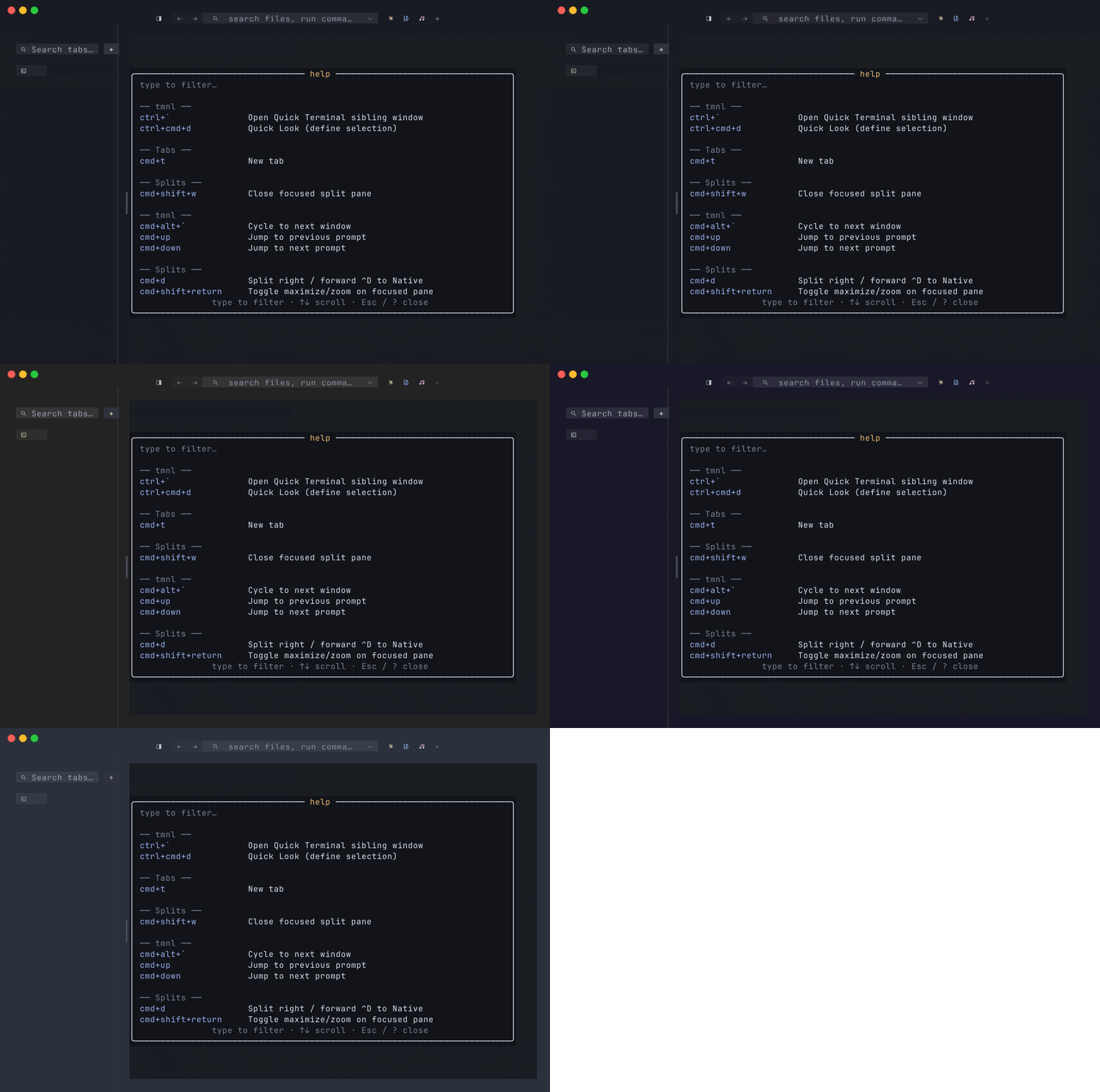
Per-window theme overrides are the same machinery, scoped through a thread-local push. See Multi-window — Phase 6b for the override layer, and the Apply-to scope toggle for picking “this window only” vs “all windows.”
Live reload — mnml integration
Section titled “Live reload — mnml integration”When mnml is also installed, tmnl can adopt mnml’s currently-selected theme automatically on startup. The integration:
- Read
~/.config/mnml/config.toml’s[ui] theme = "<name>". - Resolve
<name>through the precedence chain above. - Apply the result to tmnl’s chrome palette.
A once-per-tick mtime poll on mnml’s config file fires theme::refresh
when the mtime moves. Edit mnml’s theme name, save the file, and tmnl’s
chrome retints within one tick — no relaunch. There’s also a manual
theme.refresh command in the palette for the case where the mtime check
misses (rare; some editors rewrite the file in a way that leaves mtime
unchanged).
Where to go next
Section titled “Where to go next”- Multi-window — per-window theme overrides; the
same
Palettestruct, scoped through a thread-local push so each window can paint with its own theme. - Native tabs — hosted apps receive tmnl’s active
palette via the
Palette { bg, fg, accent }message so they can theme their chrome to match. - FEATURES.md — the shipped-feature inventory, including the bundled-themes line.
- The implementation lives in
src/theme.rs(the resolver, theMnmlTheme/GhosttyThemeparsers,Palettestruct, bundled-themeinclude_str!table). The six theme files live underthemes/.